

The GATE 2027 exam pattern is the same for every test paper at the top level: 65 questions, 100 marks, 3 hours, taken as a computer-based test in English. Here it is in one table, from the official GATE 2027 question paper pattern page and information brochure.
| Feature | GATE 2027 |
|---|---|
| Mode | Computer Based Test (CBT) |
| Language | English |
| Duration | 3 hours |
| Test papers | 30 |
| Questions | 65: 10 General Aptitude + 55 subject |
| Total marks | 100: 15 General Aptitude + 85 subject |
| Question types | MCQ, MSQ and NAT |
| Marks per question | 1 or 2 |
| Negative marking | Only on wrong MCQs: −1/3 (1-mark), −2/3 (2-mark) |
| MSQ and NAT | No negative marking, no partial marks |
| Calculator | On-screen virtual scientific calculator only |
This guide from Gate At Zeal Indore explains the GATE 2027 exam pattern in full: how each paper is split, how the marking scheme and negative marking work, when guessing makes sense, how to use the virtual calculator and how to turn the pattern into a scoring plan.
How a GATE 2027 paper is structured
Every GATE 2027 paper has two parts: General Aptitude (GA), common to all papers, and your subject section.
General Aptitude: 10 questions, 15 marks
The brochure states: “The GA section includes 5 questions carrying 1 mark each and 5 questions carrying 2 marks each.” That gives 10 questions and 15 marks, the same for every candidate in every paper.
Subject section: 55 questions, 85 marks
The rest of the paper covers your chosen subject. For most engineering papers, part of those 85 marks is Engineering Mathematics.
| Paper group | General Aptitude | Engineering Mathematics | Subject questions | Total |
|---|---|---|---|---|
| AE, AG, BM, BT, CE, CH, CS, EC, EE, ES, IN, ME, MN, MT, NM, PE, PI | 15 | 13 | 72 | 100 |
| AR, CY, DA, EY, GE, GG, MA, PH, RA, ST, XH, XL | 15 | not a separate share | 85 | 100 |
| XE | 15 | 15 (section XE0) | 70 (two optional sections) | 100 |
Source: the official question paper pattern page and Table 8 of the brochure.
Also Read: Highest Paying PSU Through GATE for CSE: Pay Scales, CTC and How to Target Them


What this means for you
- GA plus Engineering Mathematics is 28 marks in the standard engineering papers, such as CS, EC, EE, ME and CE. That is more than a quarter of the paper from two areas every candidate can prepare in a fixed way.
- Every question is worth 1 or 2 marks. 2-mark questions usually need more steps, so they decide how you plan your time.
What the questions test
The official page lists four abilities GATE questions test: recall, comprehension, application, and analysis and synthesis. Expect fewer pure-recall questions and more that ask you to apply a concept to a new case.
Question types in GATE 2027: MCQ, MSQ and NAT
The GATE 2027 exam pattern uses three question types. Section 7.2.1 of the brochure defines each one.
MCQ: Multiple Choice Question
- Format: “Each MCQ will have choice of four answers, out of which only ONE choice is correct.”
- Marks: 1 or 2.
- Negative marking: yes, on a wrong answer.
- How to approach: answer when you are sure, or when you can rule out options with real reasoning.
MSQ: Multiple Select Question
- Format: “Each MSQ will have choice of four answers, out of which ONE or MORE than ONE choice(s) is/are correct.”
- Marks: 1 or 2.
- Negative marking: none.
- Partial marks: none. The brochure says “there is NO partial mark for choosing partially correct combinations of choices or any single wrong choice.”
- How to approach: check each option on its own as true or false. Select an option only when you are sure of it, because one wrong tick makes the whole answer zero.
NAT: Numerical Answer Type
- Format: “the answer is a signed real number, which must be entered by the candidate using the virtual numeric keypad on the monitor (keyboard of the computer will be disabled).”
- Marks: 1 or 2.
- Negative marking: none. Partial marks: none.
- Decimal places: “The stem or main body of the NAT question will indicate the number of decimal places that must be specified in the answer.”
- Rounding: “Candidates are advised to round-off only at the end of the calculation and not at intermediate stages of the calculation.”
- How to approach: read the required decimal places first, keep full precision through the calculation, and round once at the end.
Quick comparison
| MCQ | MSQ | NAT | |
|---|---|---|---|
| Options | 4, one correct | 4, one or more correct | None; type a number |
| Negative marking | Yes | No | No |
| Partial marks | Not applicable | No | No |
| Answer entry | Click an option | Click one or more options | Virtual numeric keypad |
| Leave blank? | If unsure | Rarely; answer what you are sure of | Rarely; a reasoned answer costs nothing |
GATE 2027 marking scheme and negative marking
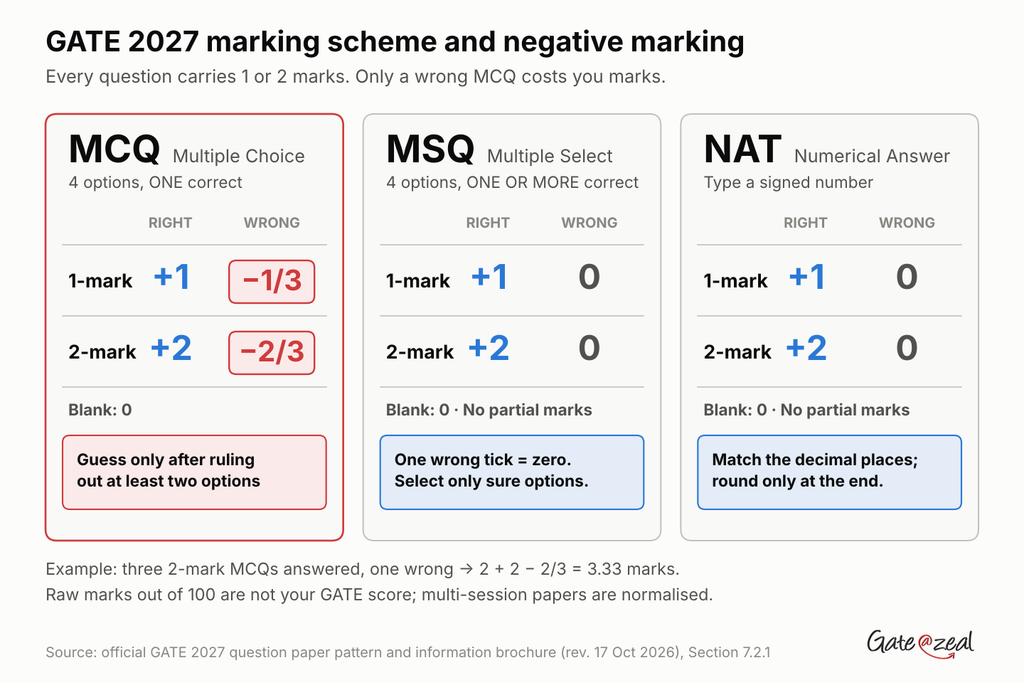
The official page states: “Questions carry either 1 mark or 2 marks.” Negative marking applies only to MCQs.
| Question type | Right answer | Wrong answer | Not attempted |
|---|---|---|---|
| 1-mark MCQ | +1 | −1/3 | 0 |
| 2-mark MCQ | +2 | −2/3 | 0 |
| 1-mark MSQ | +1 (only if fully correct) | 0 | 0 |
| 2-mark MSQ | +2 (only if fully correct) | 0 | 0 |
| 1-mark NAT | +1 | 0 | 0 |
| 2-mark NAT | +2 | 0 | 0 |
The exact official wording
- “For a wrong answer chosen in an MCQ, there will be negative marking.”
- “For a 1-mark MCQ, 1/3 mark will be deducted for a wrong answer.”
- “For a 2-mark MCQ, 2/3 mark will be deducted for a wrong answer.”
- “There is no negative marking for wrong answer(s) to MSQ or NAT questions.”
- “There is no partial marking in MSQ.”
Also Read: Is 2 Months Enough for GATE Preparation? An Honest Answer for GATE 2027
Three examples
- Example 1: you answer three 2-mark MCQs and get one wrong. Score: 2 + 2 − 2/3 = 3.33 marks.
- Example 2: an MSQ has options A and C correct. You select A, C and D. Score: 0, because one wrong choice cancels the whole answer. No penalty either.
- Example 3: a NAT answer must be given to two decimal places and is 3.14. You enter 3.1. Treat that as a likely loss, and always match the decimal places the question asks for.
Your raw score is not your GATE score
The marks you score are raw marks out of 100. The final GATE score is calculated by the organisers and, for multi-session papers, normalised across sessions. Use raw marks from mocks to track your own progress, not to predict your GATE score.
GATE negative marking math: when should you guess?
With the GATE negative marking, blind guessing does not pay on average. Here is the math, using the official penalties.
For an MCQ with k options left after you rule some out, the expected marks from a guess are:
Expected marks = (1/k) × marks − (1 − 1/k) × penalty
| Options left | 1-mark MCQ (penalty 1/3) | 2-mark MCQ (penalty 2/3) |
|---|---|---|
| 4 (pure guess) | 0 | 0 |
| 3 (one ruled out) | +1/9 ≈ +0.11 | +2/9 ≈ +0.22 |
| 2 (two ruled out) | +1/3 ≈ +0.33 | +2/3 ≈ +0.67 |
What this tells you
- A pure guess is worth zero on average. It adds risk and no expected marks.
- Each option you rule out with real reasoning tips the odds your way. With two options left, a guess is worth a third of the question’s marks on average.
- A practical rule: guess on an MCQ only after you can rule out at least two options. With one ruled out, the gain is small; decide based on how sure you are.
MSQ and NAT are different
There is no negative marking on MSQ or NAT, so a reasoned attempt can only add marks. But remember:
- MSQ: one wrong tick makes the answer zero. Select only options you are sure of.
- NAT: a random number almost never matches. Enter an answer you actually worked out.
The bigger lesson
Negative marks rarely come from a few honest guesses. They come from careless reading and rushed calculation on questions you knew. Gate At Zeal Indore suggests tracking your negative marks separately in every mock; if they keep rising, slow down on MCQs before you change anything else.
GATE virtual calculator guide
What the official rules say
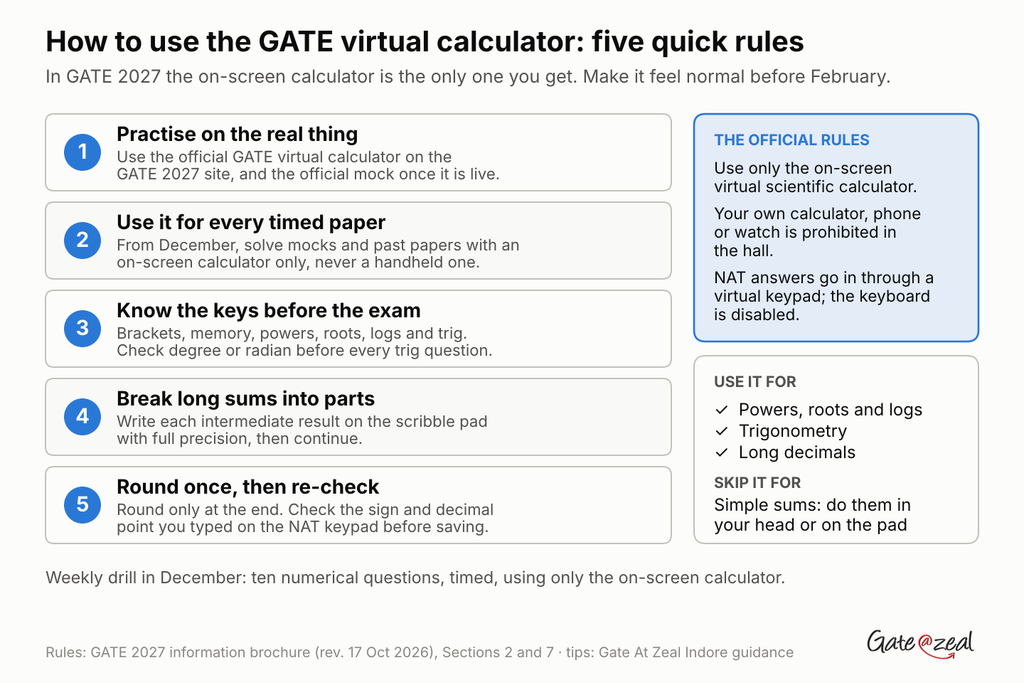
- “The candidates must use only the on-screen virtual calculator provided for their calculations.” (Brochure, Section 2)
- “A virtual scientific calculator will be available on the computer screen.” (Section 7)
- The syllabus, previous papers and mock links, “together with the virtual scientific calculator will be accessible through GATE 2027 official website.” (Section 7)
- Calculators of your own are “strictly prohibited in the exam halls”, along with phones and watches.
So you cannot carry a calculator, and the GATE virtual calculator is the only one you will have.
Why practising with it matters
An on-screen calculator is operated with the mouse, one click per key. That is slower than a handheld calculator, and many students only notice this in the exam. A NAT question with a long calculation can cost minutes if you are not used to it.
How to practise
- Use the official GATE virtual calculator from the official GATE 2027 website, and the official mock test when it is live, which runs on the real exam interface.
- Solve all your timed papers with an on-screen calculator, not a handheld one, from December onwards.
- Learn where the keys are: brackets, memory keys, powers and roots, logs, trigonometric functions and the degree/radian setting. Check the setting before every trigonometry question.
- Enter long expressions in parts, writing intermediate results on the scribble pad with full precision.
- Round only at the end, as the brochure advises for NAT answers.
Smart use, not over-use
- Do simple arithmetic mentally or on the scribble pad. Clicking through easy sums wastes time.
- Use the calculator for powers, roots, logs, trigonometry and long decimals, where mistakes are easy by hand.
- Re-check NAT entries: the answer is typed on a separate virtual numeric keypad, because the keyboard is disabled. Confirm the sign and decimal point before you save.
Gate At Zeal Indore suggests one short drill a week in December: ten numerical questions solved only with the on-screen calculator, timed, so that by January it feels normal.
Sessions, timing and exam-hall rules
Exam days and sessions
GATE 2027 runs on 6, 7, 13, 14, 20 and 21 February 2027, per the official important dates page. The paper-wise schedule has not been announced yet, as of 2 November 2026.
| Session | Exam time | Seat from | Login from | No login after |
|---|---|---|---|---|
| Forenoon | 9:30 AM to 12:30 PM | 8:50 AM | 9:10 AM | 9:45 AM |
| Afternoon | 2:30 PM to 5:30 PM | 1:50 PM | 2:10 PM | 2:45 PM |
The brochure allows seating from 40 minutes before the start, login from 20 minutes before, and no login after 15 minutes past the start.
Duration and compensatory time
The brochure says: “All test papers of GATE 2027 will be of three hours duration (a maximum of four hours in case of candidates availing compensatory time).” Eligible PwD candidates should read the brochure’s PwD section for the exact conditions.
Inside the exam hall
- Provided: the on-screen virtual scientific calculator and a scribble pad for rough work. Write your name and registration number on the scribble pad, keep only one at a time, and return it at the end.
- Prohibited: calculators, mobile phones (even switched off), watches, wallets, papers and electronic devices. The brochure says candidates found with them “will be disqualified regardless of whether they use them or not.”
- Carry: your printed admit card and the original valid photo ID you used in your application.
Papers with sections: XE, XH, XL, AR, GE, GG and RA
Some GATE 2027 papers split the 85 subject marks into a compulsory part and optional sections. This is from Table 8 and Sections 7.3.2 to 7.3.8 of the brochure.
| Paper | General Aptitude | Compulsory part | Optional part | When you choose |
|---|---|---|---|---|
| XE (Engineering Sciences) | 15 | XE0 Engineering Mathematics, 15 marks | Two of XE1 to XE9, 35 marks each | In the exam |
| XL (Life Sciences) | 15 | XL0 Chemistry, 25 marks | Two of XL1 to XL5, 30 marks each | In the exam |
| XH (Humanities and Social Sciences) | 15 | XH0 Reasoning and Comprehension, 25 marks | One of XH1 to XH6, 60 marks | At application |
| AR (Architecture and Planning) | 15 | Part A, 60 marks | B1 Architecture or B2 Planning, 25 marks | In the exam |
| GE (Geomatics Engineering) | 15 | Part A, 55 marks | B1 or B2, 30 marks | In the exam |
| GG (Geology and Geophysics) | 15 | Part A, 25 marks | B1 Geology or B2 Geophysics, 60 marks | At application |
| RA (Robotics and Automation, new) | 15 | Part A, 60 marks | B1 Electrical or B2 Mechanical, 25 marks | In the exam |
Every one of these still totals 100 marks and 65 questions, with the same MCQ, MSQ and NAT marking rules.
Notes for these papers
- XE, XL: the official page says candidates “must select any TWO” optional sections, while the brochure says “at most TWO”. Plan for two, and check the official instructions before the exam.
- XE, XH, XL codes changed from GATE 2026, as the brochure notes. Match sections by name as well as code when using past papers.
- RA is new in GATE 2027, so it has no past papers of its own.
Two papers
GATE 2027 allows one or two test papers, from the official list of allowed combinations. Each paper follows its own pattern above, and you appear for each in its own session.
How to use the GATE 2027 exam pattern in your preparation
Knowing the GATE 2027 exam pattern is useful only if it changes how you study and how you attempt the paper. Gate At Zeal Indore suggests these six moves.
1. Lock in the fixed 28 marks
In standard engineering papers, General Aptitude (15) and Engineering Mathematics (13) are 28 marks with a stable syllabus. Practise both every week from now to the exam.
2. Prepare each question type separately
- MCQ: speed and option elimination.
- MSQ: judge each option as true or false on its own; past MSQs are the best practice.
- NAT: full calculations to the required decimal places, with the on-screen calculator.
3. Score mocks exactly like GATE
Apply −1/3 and −2/3 on wrong MCQs, give zero for any MSQ with a wrong tick, and check NAT answers against the key’s value or range. Write raw marks and negative marks separately. Our guide on GATE previous year question papers shows how to self-score with official answer keys.
4. Practise a three-pass attempt
- Sure questions first, in one sweep.
- NAT and MSQ you can reason through, and longer 2-mark questions in strong areas.
- MCQs only where you can rule out options; then review marked questions.
5. Train with the virtual calculator
Use an on-screen calculator for every timed paper from December, and the official mock as soon as it is live. Our GATE 2027 mock test guide covers how to use it.
6. Watch your negative marks
Track negative marks in every mock. If they rise, slow down on MCQs and re-read questions before you change anything else.
For a full week-by-week plan, see our guide on how to prepare for GATE in 3 months.
Frequently asked questions
What is the GATE 2027 exam pattern?
GATE 2027 is a 3-hour computer-based test in English with 65 questions for 100 marks: 10 General Aptitude questions for 15 marks and 55 subject questions for 85 marks. Questions are MCQ, MSQ or NAT and carry 1 or 2 marks each.
What is the GATE 2027 marking scheme?
Each question carries 1 or 2 marks. A wrong 1-mark MCQ loses 1/3 mark and a wrong 2-mark MCQ loses 2/3 mark. There is no negative marking for MSQ or NAT, and no partial marking in MSQ.
Is there negative marking in GATE 2027?
Yes, only for wrong MCQ answers: 1/3 mark for a 1-mark MCQ and 2/3 mark for a 2-mark MCQ. MSQ and NAT questions have no negative marking.
Can I use my own calculator in GATE 2027?
No. Candidates must use only the on-screen virtual scientific calculator. Calculators, mobile phones and watches are prohibited in the exam hall.
How many marks is Engineering Mathematics in GATE 2027?
In most engineering papers, including CS, EC, EE, ME and CE, Engineering Mathematics carries 13 marks. In XE, the Engineering Mathematics section XE0 carries 15 marks.
How are NAT answers entered in GATE 2027?
NAT answers are signed real numbers entered using the virtual numeric keypad on screen; the computer keyboard is disabled. The question states the number of decimal places required, and candidates are advised to round off only at the end of the calculation.