


The GATE 2027 application form went live on 14 August 2026, and you have only until 21 September 2026 to submit it without a late fee (30 September 2026 with one). If you’ve already read up on the notification and you’re now sitting in front of the GOAPS portal wondering exactly what to click, in what order, and what your photo file size needs to be — this is the guide for that.
This is a practical, field-by-field registration guide to filling the GATE 2027 application form correctly the first time. We’ll walk through the two-stage GOAPS process, the exact document specifications you need before you start, how to choose your test paper and exam city, the mistakes that get applications stuck or rejected, and what happens after you hit submit. Wherever it’s useful, we’ve added notes from Gate At Zeal Indore, based on the questions students actually ask us every year while filling this same form.
Before You Start: What You Need Ready
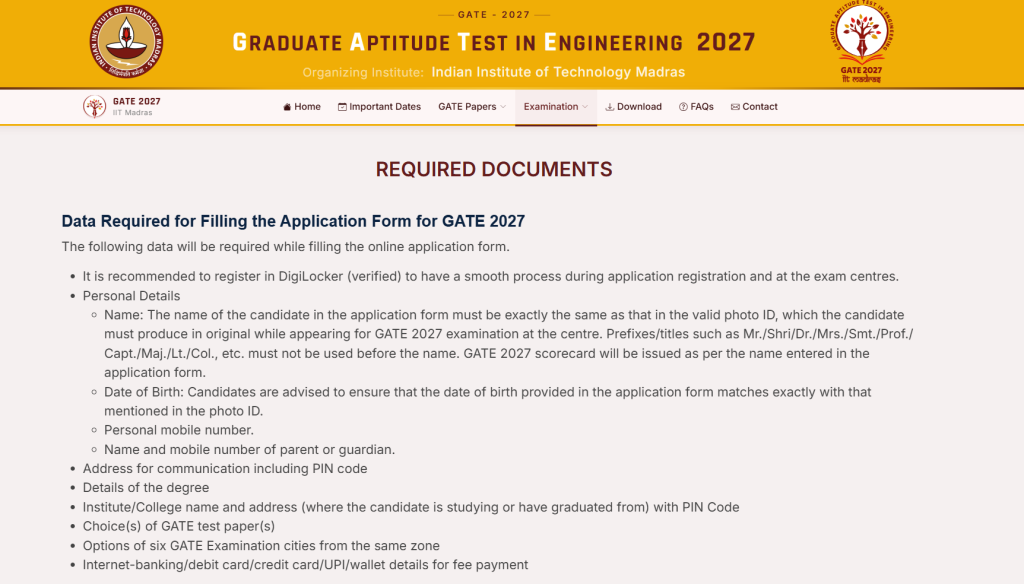
Don’t open GOAPS and start improvising — half the frustration with the GATE 2027 application form comes from candidates realising mid-form that they’re missing a document or don’t know their own category certificate number. Keep these ready on your desktop before you begin:
- A valid, active email address and mobile number you check daily — this is how you’ll receive your Enrollment ID, OTPs, and all official GATE 2027 correspondence.
- A verified DigiLocker account. GATE 2027 has made DigiLocker-based verification mandatory for Indian nationals, so if you’ve never used DigiLocker or your account isn’t linked to your Aadhaar, set this up a day or two in advance rather than during the application itself.
- A scanned passport-size photograph and scanned signature, saved separately, meeting the specifications listed further below.
- A valid photo ID — Aadhaar, PAN card, Passport, Voter ID, or Driving Licence.
- Category certificate (SC/ST candidates need a valid caste certificate; PwD candidates need a disability certificate from a competent medical authority). OBC-NCL and EWS candidates do not need to upload a category certificate at the application stage.
- Proof of qualifying degree — your degree certificate, provisional certificate, or course completion certificate. Final-year and current third-year students (eligible under the relaxed 10+2+3 ongoing criteria) can upload a bonafide or enrolment certificate from their institute instead.
- A payment method ready — debit/credit card, net banking login, or UPI.
If you’re applying from Indore and want a second pair of eyes on your documents before you upload them, this is one of the small but genuinely useful things a local coaching centre like Gate At Zeal Indore helps with during the application window — catching a wrongly-sized photo or an expired category certificate before it becomes a rejected upload.
Also Read: GATE 2027 Notification Out: Exam Dates, Application Window & Fee Structure Explained

GATE 2027 Application Form: Key Dates to Keep in Mind
The registration guide below only works if you’re inside the application window, so here’s the quick version:
| Milestone | Date |
|---|---|
| GATE 2027 application form opens | 14 August 2026 |
| Last date to apply — no late fee | 21 September 2026 |
| Last date to apply — with late fee | 30 September 2026 |
| Application correction window | Typically opens in October (limited fields) |
For the full breakdown of exam dates and the category-wise fee structure, see our detailed guide on the GATE 2027 notification. [INTERNAL LINK: your published GATE 2027 Notification, Exam Dates & Fee Structure post — "GATE 2027 exam dates and fee structure"]
Step-by-Step GATE 2027 Registration Guide
The GATE 2027 application form is filled in two distinct stages on GOAPS (GATE Online Application Processing System) — first you create your candidate profile and generate an Enrollment ID, then you log back in to complete the full form. Trying to do everything in one sitting without understanding this two-stage structure is where most first-time applicants get confused.
Stage 1: New Candidate Registration (Getting Your Enrollment ID)
- Go to the official website — gate2027.iitm.ac.in — and click through to the GOAPS application link. Bookmark this page; you’ll be coming back to it repeatedly over the next few weeks.
- Click “New Registration” on the GOAPS homepage. This is only for candidates applying for the first time this cycle.
- Enter your email address and mobile number, and verify both via the OTPs sent to each. Use details only you have access to — not a parent’s or friend’s number, since this is how you’ll be contacted throughout the admissions cycle.
- Complete DigiLocker verification. Since this is mandatory for Indian nationals in GATE 2027, you’ll be prompted to link and verify your DigiLocker account as part of registration. Keep your Aadhaar-linked mobile number handy for this step.
- Receive your Enrollment ID and a temporary password, sent to your registered email and mobile number. This Enrollment ID is your identity for the entire GATE 2027 cycle — application, admit card, result, and counselling — so save it somewhere you won’t lose it.
Also Read: Best Test Series for GATE CSE: What to Look For and Why GATE At Zeal Leads the List
Stage 2: Filling the Full GATE 2027 Application Form
- Log in to GOAPS using your Enrollment ID and the temporary password, and set a new, memorable password when prompted.
- Fill in your personal details — full name exactly as it appears on your photo ID, date of birth, gender, category (General/OBC-NCL/SC/ST/EWS), PwD status if applicable, nationality, and current address. Small mismatches here (like a shortened name) are one of the most common reasons applications get flagged later.
- Fill in your academic details — your qualifying degree, institute name, year of study or graduation, and any other academic information the form requests. Third-year students applying under the relaxed eligibility should double-check this section carries their correct, current year of study.
- Choose your test paper(s). You can select up to two papers, but only from the specific combinations GATE 2027 permits — check the official list before deciding, since an invalid combination will cause your second paper choice to be rejected at verification.
- Select your preferred exam cities, usually two to three, in order of preference. Candidates in Indore should list Indore first if it’s available for their chosen paper, and a nearby alternative as backup.
- Upload your photograph, meeting the specifications in the section below.
- Upload your signature, meeting the specifications in the section below.
- Upload your remaining documents — photo ID, category certificate (if applicable), PwD certificate (if applicable), and academic proof.
- Preview your entire application. GOAPS shows you a full preview before final submission — read every field slowly, especially your name, category, paper choice, and exam city order. This is your last easy chance to fix an error.
- Pay the application fee online through net banking, debit/credit card, or UPI. Wait for the payment confirmation screen before closing your browser tab.
- Download and save your confirmation page (as PDF, and ideally print a copy too). This, along with your Enrollment ID, is what you’ll need if you ever need to raise a query with the GATE office.
That’s the complete GATE 2027 application form process from start to finish — sixteen steps across two stages, most of which take a few minutes each once your documents are ready.
Fee Payment: What to Know Before You Pay
The payment step trips up more candidates than it should, usually because of timing rather than the process itself. A few practical points:
- Pay in one sitting once you reach the payment screen — don’t navigate away or refresh mid-transaction, since GOAPS payment gateways can be sensitive to interrupted sessions.
- If the amount is deducted from your bank account but GOAPS doesn’t show a success confirmation, don’t pay again immediately — wait a few hours and check your application status first, since duplicate payments for the same application are difficult to reverse.
- Keep a screenshot or PDF of the payment confirmation separately from the application confirmation page, in case you need to raise a payment-specific query later.
- Fees are non-refundable, so confirm your paper choice, category, and exam city preferences before you pay — not after.
How to Pace Yourself Across the Registration Window
Because the GATE 2027 application form stays open for roughly five weeks (14 August to 21 September 2026), there’s a real temptation to leave it for later. Resist it. Here’s a simple way to pace this registration guide across the window rather than compressing it into a stressful last weekend:
- Week 1 (14–20 August): Set up your DigiLocker account, gather and scan all documents, and complete Stage 1 registration to get your Enrollment ID.
- Week 2–3 (21 August–3 September): Log in, fill personal and academic details, and finalise your paper and exam city choices. Don’t rush this — these are the fields hardest to change later.
- Week 4 (4–14 September): Upload documents, run through the preview screen at least twice, and get a second person (parent, friend, or your coaching mentor) to proofread your entries.
- Final week (15–21 September): Submit and pay well before 21 September — ideally by the 18th or 19th, not on the deadline itself, since traffic on GOAPS spikes sharply in the final 48 hours and slow page loads or payment timeouts become far more common.
Spreading the process out like this also means that if a document gets rejected on upload (a common issue with photos and signatures), you still have time to fix and re-upload it instead of scrambling right before the deadline.
Document Specifications for the GATE 2027 Application Form
Getting your photo and signature specifications right the first time saves you from re-uploading and re-verifying, which can eat up real time during a busy application window. Here’s the checklist:
| Document | Specification |
|---|---|
| Photograph | Passport size (3.5 cm × 4.5 cm), face covering 60–70% of the frame, white/light plain background, frontal view, no cap/sunglasses/colored glasses. JPEG format, 5–200 KB. |
| Signature | Full name signed in black or dark blue ink — not initials, not all capital letters. Aspect ratio (height:width) between 1:2.75 and 1:3.75. JPEG/JPG format, 5–150 KB. |
| Photo ID | Aadhaar, PAN card, Passport, Voter ID, or Driving Licence — clear scan, all details legible. |
| Category certificate | Required for SC/ST (valid caste certificate) and PwD (disability certificate from a competent medical authority). Not required at application stage for OBC-NCL or EWS. |
| Academic proof | Degree certificate, provisional certificate, or course completion certificate; final-year or eligible third-year students may upload a bonafide/enrolment certificate instead. |
A quick, practical note: don’t just crop an old ID photo to “passport size” — the 60–70% face-coverage guideline and plain background requirement are specific enough that a poorly cropped photo is one of the most common upload rejections on the GATE 2027 application form. If you’re not confident about resizing images to an exact KB range, use a basic online photo/signature resizer built for exam applications rather than guessing in a general photo editor.
Also Read: How to Crack GATE CSE with Top Rank: The Complete Roadmap
Choosing Your Test Papers and Exam City Wisely
Two choices inside the GATE 2027 application form quietly matter more than candidates expect: your paper selection and your exam city order.
Paper selection. If you’re appearing for a single paper, this is straightforward — pick the subject that matches your target M.Tech programme or PSU recruitment. If you’re considering two papers (for example, pairing your core branch with a related option like the new Robotics and Automation paper), check the official permitted-combination list carefully before selecting. Fee is charged separately per paper, so a two-paper application costs double, and once the correction window closes, you generally cannot switch a subject you’re unprepared for.
Exam city. Your listed cities affect your travel, your rest before the exam, and — indirectly — your performance. List your genuinely preferred city first (Indore, if you’re based there and it’s offered for your paper), and choose a realistic backup rather than a random second option. Centres are allotted on a first-come, reasonably-matched basis, so applying early in the window slightly improves your odds of getting your first preference.
Common Mistakes That Delay or Reject GATE 2027 Applications
These are the errors that come up most often once candidates actually sit down to fill the GATE 2027 application form:
- Skipping the DigiLocker step or leaving it incomplete — since it’s now mandatory, an unverified DigiLocker account can hold up your entire registration at Stage 1 itself.
- Uploading a photo with the wrong background or face ratio — a photo taken on a phone against a patterned wall, or an old ID photo that’s been cropped down, is a frequent rejection reason.
- Signature in the wrong aspect ratio or in block capitals — GOAPS checks the height-to-width ratio programmatically, so a signature scanned at the wrong proportions will bounce even if it looks fine to the eye.
- Name mismatch between the application, photo ID, and academic documents — even a missing middle name or a different spelling can create downstream issues at admit card or verification stage.
- Selecting an unsupported two-paper combination — always confirm against the official list rather than assuming any two subjects can be paired.
- Rushing the preview step — the preview screen exists precisely so you catch errors before submission; skimming past it is how avoidable mistakes make it into a final, fee-paid application.
- Not saving the Enrollment ID and confirmation page — you’ll need both repeatedly over the next several months, right through admit card and result.
- Applying from an unstable internet connection — a dropped connection mid-upload can corrupt a document submission; use stable Wi-Fi rather than mobile data where possible, especially for the document upload and payment steps.
- Leaving everything for the last weekend of September — beyond the general stress, high traffic in the final days increases the odds of slow uploads, session timeouts, and payment failures right when you have the least buffer time left to fix them.
What Happens After You Submit the GATE 2027 Application Form
Once your GATE 2027 application form is submitted and the fee payment is confirmed, here’s what to expect next:
- You’ll receive a confirmation email/SMS — keep it, along with your downloaded confirmation page.
- A correction window typically opens a few weeks after the regular deadline (usually in October), allowing limited edits to specific fields. This is not a chance to redo your application from scratch, so treat your original submission as final wherever possible.
- Your admit card becomes available for download from 3 January 2027, at which point your exact exam date, shift, and city are confirmed.
- Keep checking the registered email and the GOAPS portal periodically between now and January — GATE communicates updates, corrections windows, and any changes primarily through these channels, not through third-party sites.
Registering for GATE 2027? Here’s How Gate At Zeal Indore Can Help
Filling the GATE 2027 application form correctly is a one-time, administrative task — but it’s also the first real checkpoint in a six-month preparation journey that ends in February 2027. Students working with Gate At Zeal Indore typically use this application window as the natural start line: form submitted, paper and city locked in, and straight into a structured study plan rather than a delayed, disorganised start.
Gate At Zeal has built its name in Indore primarily around GATE Computer Science/IT coaching, with structured material for Mechanical, Electrical, and Civil aspirants as well. If you’re applying this year and want your registration guide moment to also be the moment you commit to a real preparation plan, here’s what’s available:
- Guidance on paper and combination choices for students unsure whether a second paper (including the new Robotics and Automation option) makes sense for their goals.
- Offline classroom batches in Indore, plus online coaching, so you can pick the format around your college or work schedule.
- Small batch sizes with faculty who are industry experts and former GATE toppers, so questions about your specific application choices — not just your syllabus — get answered.
- A structured test series that mirrors the real GATE 2027 pattern, ready for when your registration is done and your actual preparation begins in earnest.
Explore Gate At Zeal’s GATE coaching in Indore or their online GATE CS coaching once your application form is submitted — the sooner your registration is locked in, the sooner your six-month runway to February 2027 can actually start.
FAQs: GATE 2027 Application Form & Registration
Is DigiLocker mandatory for the GATE 2027 application form? Yes, for Indian nationals. DigiLocker-based verification is a mandatory part of the Stage 1 registration process this year, so set up and verify your account before you start.
Can I edit my GATE 2027 application form after I’ve submitted it? Only during the official correction window, which typically opens a few weeks after the regular deadline and allows limited edits to specific fields — it’s not a full re-submission opportunity. Get the original form right rather than relying on this.
What if my photograph or signature gets rejected? Re-check it against the exact specifications — photo: JPEG, 5–200 KB, passport size, white background, face covering 60–70% of frame; signature: JPEG, 5–150 KB, correct aspect ratio, full name and not initials — and re-upload before your final submission.
Can I apply for two GATE 2027 papers in the same application form? Yes, but only using specific permitted paper combinations listed in the official brochure. The fee is charged separately for each paper.
Do OBC-NCL and EWS candidates need to submit a category certificate? No — the GATE 2027 application form does not require OBC-NCL or EWS candidates to upload a category certificate at the application stage, unlike SC/ST and PwD candidates.
What is an Enrollment ID and why does it matter? It’s the unique ID generated when you first register on GOAPS, and it stays your identity for the entire GATE 2027 cycle — used to log back in, download your admit card, check results, and register for counselling. Save it the moment you receive it.
How long does it take to fill the GATE 2027 application form? If your documents are ready in advance, Stage 2 of the form itself typically takes 20–30 minutes. Most of the time candidates lose is spent scanning, resizing, and re-uploading documents that don’t meet specifications the first time — which is exactly why preparing everything beforehand, as outlined earlier in this registration guide, is worth the extra hour upfront.
Conclusion: Get Your GATE 2027 Application Form Right, Then Move On to Prep
The GATE 2027 application form isn’t complicated once you know the two-stage GOAPS process, have your documents ready in the right specifications, and don’t rush the preview screen before submitting. Register early inside the window rather than waiting for the last few days of September — server load, document corrections, and DigiLocker verification all get more stressful the closer you cut it to 21 September 2026.
Once your form is submitted, treat it as the actual start of your GATE 2027 preparation, not a separate task to forget about. If you’re in Indore and want structured support turning a submitted application into a real exam-ready plan, Gate At Zeal Indore works with students through exactly this transition — from registration guide to result day. Reach out to plan your next six months before the application window closes.