

New GATE 2027 registration through DigiLocker is mandatory for all Indian nationals, according to the official GATE 2027 website. Several of the GATE 2027 DigiLocker registration problems in the official guide trace back to one cause: using an unverified DigiLocker account, or having two accounts tied to the same email or mobile number.
The quickest fix for most errors is the same three moves from the official issues-and-solutions guide. Use your verified DigiLocker account (the one with a blue checkmark). Revoke the GATE-2027 consent in DigiLocker if something went wrong. Then restart the application in a private or incognito browser window.
Time is short. Regular registration closed on 5 October 2026, and the late-fee window closes on 12 October 2026. This guide from Gate At Zeal Indore lists every problem the official guide and FAQs cover, with the fix for each, as of 9 October 2026.
Where DigiLocker fits in the GATE 2027 application
You start the GATE 2027 application on the official GOAPS portal and sign in through DigiLocker. DigiLocker is the government’s digital document service, and GOAPS uses it to confirm who you are and to pull some of your details.
According to the official FAQs, your address and date of birth are fetched from DigiLocker or Aadhaar during registration. That is why a mismatch or an unlinked mobile number shows up as a missing address or a data error on the form.
What DigiLocker is used for, and what it is not
- Used for: signing in to GOAPS, fetching address and date of birth, and, for SC/ST and PwD candidates only, reading the category or disability certificate from a “GATE2027” folder in DigiLocker Drive.
- Not used for your photo: the FAQs say the photo in Aadhaar or DigiLocker is not considered; your live photo and uploaded photo are used.
- Not used for marksheets: you do not need to upload 10th, 12th, UG or PG marksheets in DigiLocker for GATE 2027 registration.
- Not needed for General, OBC-NCL and EWS documents: these candidates do not have to upload anything to the GATE2027 folder.
Keep the account after you apply
The official site asks candidates not to delete their verified or unverified DigiLocker accounts after submitting the application. It also says future GATE 2027 communication will be made only with respect to the DigiLocker account. Deleting it to “start fresh” can cut you off from your own application.
Foreign nationals use a separate link meant exclusively for them, and must carry their foreign passport on exam day. This guide covers Indian nationals, who must register through DigiLocker.
Common problems at a glance
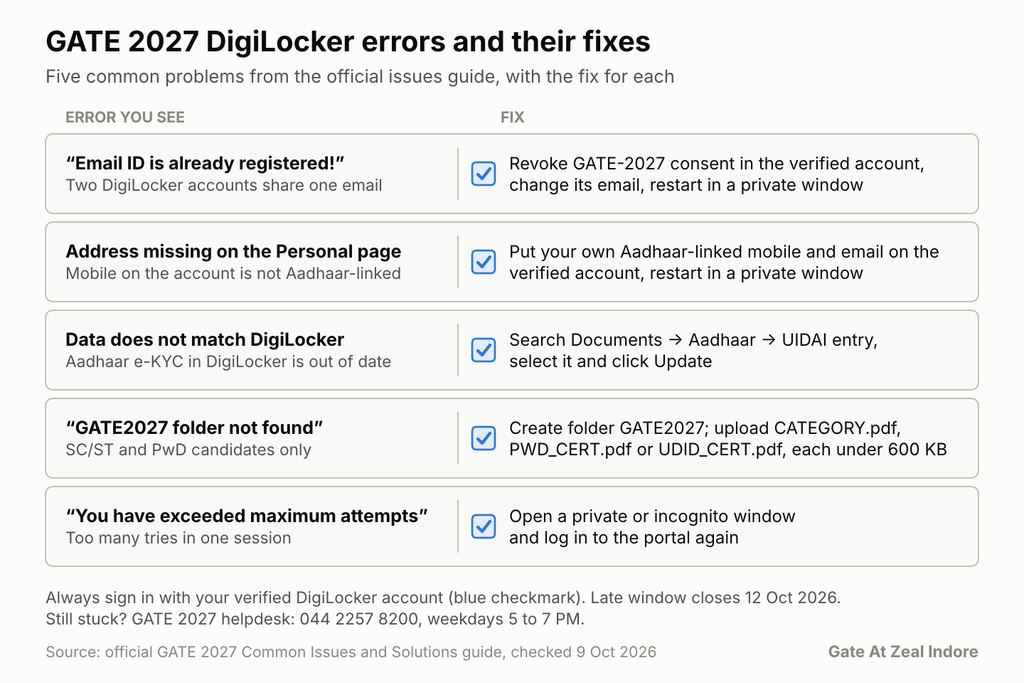
This table covers the issues in the official GATE 2027 Application: Common Issues and Solutions guide and the GATE 2027 FAQs. The sections below explain each fix.
| Problem you see | Likely cause | Fix |
|---|---|---|
| “Email ID is already registered!” | A verified and an unverified DigiLocker account share one email | Revoke GATE-2027 consent in the verified account, change its email in My profile, restart in a private window with the verified account |
| Complete address missing on the Personal page | The unverified account’s mobile number is not linked to your Aadhaar | Update mobile and email in the verified account, restart in a private window |
| Address Line 1 or Lines 1 and 2 empty | Address is fetched automatically | If the other address fields are filled, continue |
| Data does not match DigiLocker | Your Aadhaar e-KYC in DigiLocker is out of date | Update e-KYC from the Aadhaar entry in DigiLocker |
| “GATE2027 folder not found in DigiLocker Drive” (SC/ST, PwD) | Folder or file missing, wrongly named or too large | Create a GATE2027 folder; upload CATEGORY.pdf, PWD_CERT.pdf or UDID_CERT.pdf under 600 KB |
| DigiLocker Drive access not granted | Drive permission was refused during consent | Revoke GATE-2027 consent, log in again, allow Drive access |
| Consent validity changed | The validity date was edited on the consent screen | Revoke consent, log in again, leave the date unchanged, click Allow |
| “OOPS” error in the DigiLocker app | App session problem | Uninstall the app, revoke consent on the DigiLocker website, retry |
| “Enter a valid college name” | Special characters in the name | Remove characters such as ( ) and &, or type the name if it is not listed |
| “You have exceeded maximum attempts” | Too many tries in one session | Open a private or incognito window and log in again |
| Two unverified accounts | Neither account is verified | Verify one on the DigiLocker website and continue with it |
| One verified, one unverified account | Wrong account chosen at sign-in | Always choose the verified account, marked with a blue checkmark |
| Connection failed during submission | Network drop | Log in to the application portal again and continue |
If your problem is not in this list, the official guide sends you to the GATE 2027 helpdesk at 044-22578200.
Aadhaar, mobile number and OTP problems
The mobile number is where many DigiLocker problems start. DigiLocker sends sign-in codes to the mobile number on the account, and the GATE portal fetches your address and date of birth through the Aadhaar link.
The mobile number belongs to a parent or guardian
The official guide describes this case directly. If your unverified DigiLocker account uses a mobile number that is not linked to your Aadhaar, for example a parent’s number, the Personal page may not show your complete address. The fix is to update the mobile number and email in your verified account, then restart the application in a private window.
One mobile number, several DigiLocker accounts
If one mobile number is linked to more than one DigiLocker account, DigiLocker asks you to choose the account to sign in with. Pick the verified account every time. The official FAQs say you must continue with the verified account, and the email error in the table above shows what happens when two accounts collide.
The code does not arrive or expires
The official GATE 2027 pages do not list OTP failures as a separate issue, so treat these as general sign-in checks:
- Confirm the number shown on the DigiLocker sign-in page is the one in your hand.
- Wait for the code before you request another, and enter it within the time shown.
- If you see “You have exceeded maximum attempts”, stop retrying in the same tab. The official fix is to open a private or incognito window and log in again.
Aadhaar details are out of date
If the portal reports a data discrepancy with DigiLocker, the official guide says to update your e-KYC inside DigiLocker. Search for Aadhaar under Search Documents, open the UIDAI entry, select it and click Update. If the details in Aadhaar itself are wrong, those must be corrected with Aadhaar first, and that can take longer than the GATE window allows. Check early.
Name, date of birth and photo mismatch
The official FAQs cover mismatches directly, and most have a simple answer.
Name or date of birth differs across documents
The FAQs say you may choose the ID that has the correct name and date of birth. Check the details on that photo ID before you submit. GATE verifies your identity using the photo ID you submit with the application, not your academic documents.
Indian candidates can use Aadhaar (preferred), passport, PAN card, voter ID or driving licence. Whichever you choose, carry the same original, valid ID to the exam hall, since photocopies and expired documents are not accepted.
Name changed after marriage
The FAQs allow you to upload the photo ID with your old name along with an affidavit. You must also carry that affidavit to the exam hall.
Spelling mistake in your name on the form
Once you complete the application, you cannot change it yourself. The FAQs say corrections can be made later with supporting documents, so do not create a second application to fix a typo.
Old or different photo in Aadhaar or DigiLocker
This one is not a problem. The photo in Aadhaar or DigiLocker is not considered for GATE 2027; your live photo and uploaded photo are used instead.
Wrong ID number or a swapped ID
If you enter the wrong ID number, or upload a different ID from the one you named, the application is marked DEFECTIVE. You then fix it when your zone contacts you, by uploading the correct ID image or correcting the number. Check the ID type, number and image match before you submit.
Documents not fetched or not found
You do not need your degree or marksheets in DigiLocker
A common worry is that a missing degree or marksheet in DigiLocker will block registration. The official FAQs say you do not need to upload 10th, 12th, UG or PG marksheets in DigiLocker for GATE 2027 registration. General, OBC-NCL and EWS candidates also do not need to upload anything to the GATE2027 folder.
SC/ST and PwD candidates: the GATE2027 folder
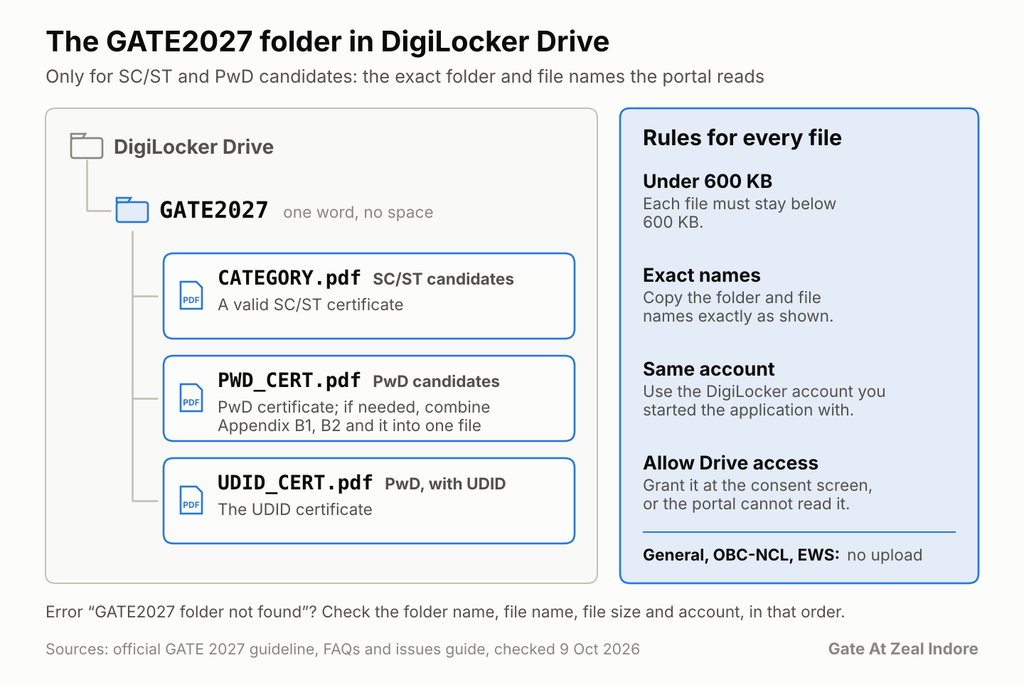
If you are an SC/ST or PwD candidate, the portal reads your certificate from a folder in DigiLocker Drive. The official guideline and issues guide set exact rules:
- Create a folder named GATE2027 in your DigiLocker Drive.
- SC/ST candidates upload a valid certificate named CATEGORY.pdf.
- PwD candidates upload a valid certificate named PWD_CERT.pdf. If needed, combine Appendix B1, Appendix B2 and the PwD certificate into one document.
- Candidates with a UDID certificate upload it as UDID_CERT.pdf.
- Keep each file under 600 KB.
- Use the same DigiLocker account you used to start the application.
What the errors mean
The issues guide lists three symptoms for this case: the Address Line 1 field missing, a red error on highlighted fields, and “GATE2027 folder not found in DigiLocker Drive”. Each points to the folder rules above. Check the folder name, the file name, the file size and the account, in that order.
File and folder names must match exactly, so copy them as written here. A folder called “GATE 2027” with a space, or a file saved as “Category.pdf.pdf”, is the kind of small slip that triggers the not-found error.
Drive access not granted
The portal also needs permission to read your Drive. If you refused it at the consent screen, revoke the GATE-2027 consent under Manage Account Settings in DigiLocker. Then log in to the application portal again and grant Drive access when asked.
Login, consent and browser errors
Many sign-in errors clear once you reset the consent and use a clean browser session. These are the cases the official guide covers.
Consent validity was changed
During sign-in, DigiLocker shows a consent screen with a validity date. If you edit that date, the official guide says to revoke the GATE-2027 consent, log in again, leave the validity date unchanged and click Allow.
“OOPS” error in the DigiLocker app
If the DigiLocker app shows an OOPS error, the guide says to uninstall the app, revoke the consent on the DigiLocker website, and then retry.
“Email ID is already registered!”
This appears when a verified and an unverified DigiLocker account share one email. Revoke the GATE-2027 consent in the verified account, change that account’s email in My profile, then restart the application in a private or incognito window and log in with the verified account.
“You have exceeded maximum attempts”
Open a private or incognito window and log in to the portal again.
The connection dropped during submission
The FAQs say to log in to your account at the application portal again and continue. Do not start a new application: the FAQs say you should not create another enrolment ID.
How to retry safely
- Use one browser and one private window per attempt, so old sessions do not interfere.
- Sign in only with your verified account.
- Note your enrolment ID and password as soon as you have them; the FAQs say you can log in with them later to print your form.
- The guideline page links official help videos for the DigiLocker consent page error and the DigiLocker error via GOAPS; watch them before you contact the helpdesk.
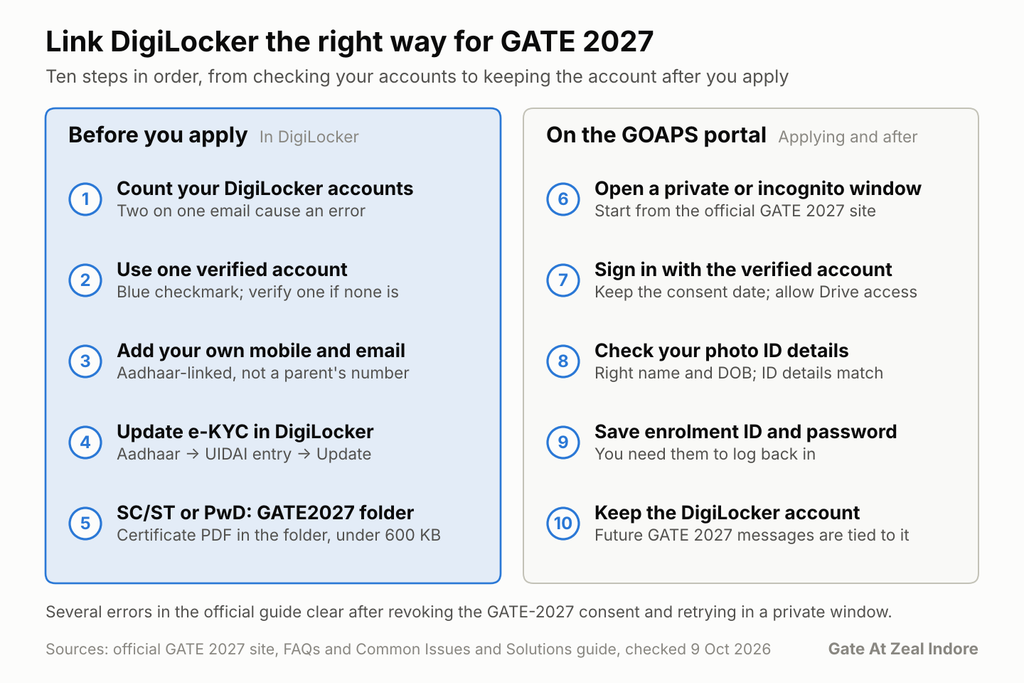
Step by step: link DigiLocker the right way
Follow these steps in order before you open the GATE 2027 form. They are built from the official site, guideline page, FAQs and issues guide.
- Find out how many DigiLocker accounts you have. Check whether your email or mobile number is used by more than one account. Two accounts on one email cause the “already registered” error.
- Pick or create one verified account. A verified account shows a blue checkmark next to the name. If you only have unverified accounts, verify one on the DigiLocker website first.
- Put your own Aadhaar-linked mobile and email on that account. A parent’s number can leave your address incomplete on the form.
- Update e-KYC inside DigiLocker. Open the Aadhaar entry under Search Documents, select the UIDAI record and click Update, so your address and date of birth are current.
- SC/ST or PwD candidates only: prepare the GATE2027 folder. Upload CATEGORY.pdf, PWD_CERT.pdf or UDID_CERT.pdf, each under 600 KB, in the same account.
- Open a private or incognito window. Go to the official GATE 2027 site and start on the GOAPS portal.
- Sign in with the verified account and accept the consent as shown. Do not change the validity date, and allow Drive access if asked.
- Fill the form and check your photo ID details. Choose the ID with the correct name and date of birth, and make sure the ID type, number and image match.
- Save your enrolment ID and password. You will need them to log back in.
- Keep the DigiLocker account. Do not delete it after you apply, because future GATE 2027 communication is tied to it.
Gate At Zeal Indore suggests doing steps 1 to 5 a day before you apply, so any Aadhaar or account fix has time to take effect.
If DigiLocker still fails
The official site makes DigiLocker registration mandatory for all Indian nationals, and it describes no other route for them. If the fixes above have not worked, move to official help quickly.
Contact the GATE 2027 helpdesk
The official contact details are:
- Phone: 044 2257 8200
- Email: helpdesk@gate.iitm.ac.in
- Hours for application queries: Monday to Friday, 5:00 PM to 7:00 PM
- Address: GATE-JAM Office, IIT Madras, Chennai 600 036
The official issues guide also points to this helpdesk for any problem it does not list.
What to send the helpdesk
A clear message gets a faster answer. Include:
- Your name and, if you have one, your enrolment ID.
- The exact error text, word for word, and the page where it appeared.
- A screenshot of the error.
- What you have already tried: consent revoked, private window, verified account used, e-KYC updated.
- Whether you have more than one DigiLocker account.
Watch the official help videos
The guideline page links short videos for the DigiLocker consent page error and the DigiLocker error via GOAPS. They are worth a look before you call, since helpdesk hours are limited.
Do not make these moves
- Do not create a second enrolment ID to get around an error.
- Do not delete your DigiLocker account to start again.
- Do not use a different person’s DigiLocker or Aadhaar-linked number to get past a step.
- Do not use help offered by unofficial pages or social media accounts that ask for your passwords or codes.
GATE 2027 deadlines that decide how long you have
As of 9 October 2026, the official GATE 2027 important dates page leaves very little time to fix a DigiLocker problem.
- 2 September 2026: GOAPS registration opened.
- 5 October 2026: regular registration closed.
- 12 October 2026: the late-fee window closes, with a ₹500 extra fee.
- 4 January 2027: city allotment.
- 6, 7, 13, 14, 20 and 21 February 2027: exam days over three weekends.
- 19 March 2027: results.
If you have not finished, treat 12 October as your hard stop. Helpdesk hours for application queries are 5:00 PM to 7:00 PM on weekdays, and 12 October 2026 is a Monday, so do not leave a DigiLocker fix for the last evening. The admit card date is not yet announced on the official page.
Frequently asked questions
Is DigiLocker mandatory for GATE 2027 registration?
Yes, for Indian nationals. The official GATE 2027 website says new registration through DigiLocker is mandatory for all Indian nationals. Foreign nationals use a separate link.
How do I fix “Email ID is already registered” in GATE 2027?
Revoke the GATE-2027 consent in your verified DigiLocker account and change that account’s email in My profile. Then restart the application in a private or incognito window and log in with the verified account.
What if my name or date of birth differs between Aadhaar and my certificates?
Choose the photo ID that shows your correct name and date of birth, and check it before you submit. GATE verifies identity from the photo ID submitted with the application, not from academic documents.
Do I need to upload my marksheets to DigiLocker for GATE 2027?
No. The official FAQs say 10th, 12th, UG and PG marksheets are not needed in DigiLocker for registration. Only SC/ST and PwD candidates upload a certificate to the GATE2027 folder.
Can I delete my DigiLocker account after applying?
No. The official site asks candidates not to delete their DigiLocker accounts after submitting, because future GATE 2027 communication is made with respect to that account.