


GATE 2027 Registration is officially open, and this cycle looks different from every year before it — DigiLocker is now mandatory, live facial verification is part of the form, and the timeline itself was revised partway through. If you’re applying for GATE 2027, the process has more steps than you’d expect, and skipping one can cost you your application.
Gate At Zeal Indore has put together the complete, current step-by-step guide below — from setting up DigiLocker to downloading your final confirmation page.
Quick answer: GATE 2027 registration opened on 2 September 2026 on GOAPS (gate2027.iitm.ac.in). The regular deadline is 27 September 2026 (19 days from today), with a late-fee window open until 5 October 2026. Registration requires a DigiLocker-linked profile and live facial verification — Indian candidates cannot complete the form without it.

GATE 2027 Registration Timeline
| Milestone | Date |
|---|---|
| GATE 2027 notification released | 20 July 2026 |
| Registration (GOAPS) opened | 2 September 2026, ~7:00 PM |
| Regular registration deadline | 27 September 2026 |
| Extended deadline (with late fee) | 5 October 2026 |
| Admit card release | 3 January 2027 |
| Exam dates | 6, 7, 13, 14, 20, 21 February 2027 |
| Result declaration | Mid-March 2027 (expected) |
A quick note on accuracy: IIT Madras revised the original GATE 2027 registration schedule after briefly marking it “TBA,” which is why you may see slightly different dates on older articles. The dates above reflect the confirmed, current timeline.
Also Read: GATE 2027 Exam Dates — Full Schedule
GATE 2027 Registration Fee
Fees are charged per paper — attempting two papers costs double.
| Category | Regular Period | Extended (Late Fee) Period |
|---|---|---|
| Female / SC / ST / PwD | ₹1,000 | ₹1,500 |
| All other candidates (incl. foreign nationals) | ₹2,000 | ₹2,500 |
PwD here means Persons with Benchmark Disability (40% or higher). Fees are non-refundable, and standard payment gateway/bank charges may apply on top.
Documents You Need Before You Start
Keep these ready before you open the GOAPS portal — hunting for them mid-registration is the single biggest reason applications get abandoned or delayed:
- A device with a 5 MP or better camera (webcam or smartphone) for live facial verification
- A verified, Aadhaar-linked DigiLocker account
- Valid Photo ID — Aadhaar, PAN, Passport, Voter ID, or Driving Licence (carry the original to your exam centre later)
- Recent colour passport-size photograph (JPEG, under 3 months old)
- Scanned signature image (JPEG)
- SC/ST category certificate (PDF), if applicable
- UDID or PwD certificate (PDF), if applicable
- Dyslexia certificate (PDF), if you’re requesting a scribe or compensatory time
- Academic details on hand: degree name, institution, field of study, year, GPA/percentage
- A working payment method (card or digital wallet)
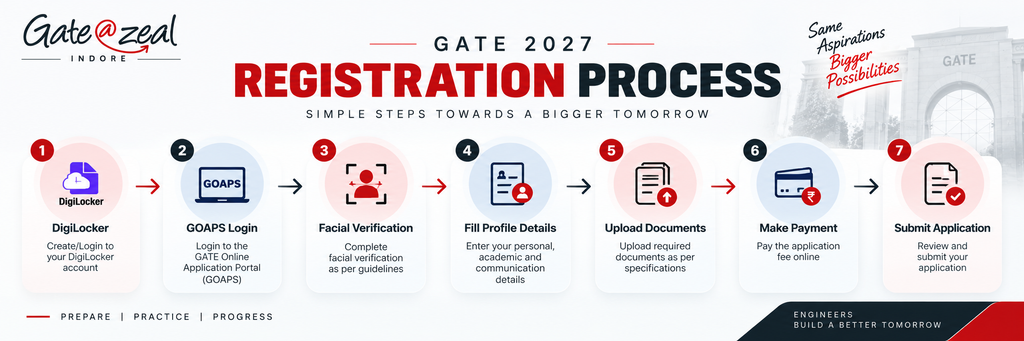
GATE 2027 Registration: Step-by-Step Application Guide
Step 1: Set Up or Verify Your DigiLocker Account
If you don’t already have one:
- Go to digilocker.gov.in or the DigiLocker app
- Sign up with your Aadhaar-linked mobile number and verify via OTP
- Set a security PIN/password
- Complete your profile so it matches your Aadhaar (name, DOB, gender)
- Link and verify your Aadhaar
If you already have an account, log in and confirm your name, date of birth, photo, mobile number, and email are current and match your official documents — mismatches here are the most common cause of registration failures.
Step 2: Start Your GATE 2027 Application on GOAPS
- Visit gate2027.iitm.ac.in and open the GOAPS portal
- Register with a valid email address and mobile number
- Click “Go to DigiLocker” when prompted
- Authenticate with your mobile number and OTP/PIN
- Authorise GOAPS to pull your verified DigiLocker details
Step 3: Complete Facial Verification
Use your webcam or phone camera to complete a live facial capture. The system matches this live image against your DigiLocker ID photo to confirm your identity — this step cannot be skipped or completed with an uploaded photo.
Step 4: Review and Complete Your Profile
- Check the auto-filled fields (name, DOB, address, photograph) for accuracy
- Fill in your academic qualification details
- Select your test paper — or two papers, if you’re using an approved combination
- Choose up to six preferred exam cities within your assigned zone
Step 5: Upload Documents
Upload your photograph, signature, photo ID scan, and any category certificates (SC/ST/PwD/dyslexia) in the specified formats.
Step 6: Pay the Application Fee
Complete payment online through the available gateway options based on your category and paper count.
Step 7: Submit and Save Your Confirmation
Submit the form to receive your Enrollment ID and a temporary password by email and SMS — save both; you’ll need them through admit card release, results, and counselling. Download and store your confirmation page separately.
For Foreign Nationals
Foreign candidates skip the DigiLocker step entirely. Instead, you register directly with your full name (exactly as on your Photo ID), email, phone number, and a password, then complete the rest of the form manually.
Common Mistakes to Avoid During GATE 2027 Registration
- Waiting until the last few days. With DigiLocker and facial verification now mandatory, first-time technical glitches are common — don’t attempt this for the first time on 27 September.
- Aadhaar/DigiLocker name mismatches. Even a small spelling difference between your Aadhaar and your certificates can block auto-verification.
- Wrong photo/signature specs. Old or improperly sized scans are a frequent rejection reason.
- Losing your Enrollment ID and password. You’ll need these again for admit card download and counselling — store them somewhere safe immediately.
- Picking exam cities outside your zone. Only cities within your assigned zone are valid choices.
Gate At Zeal Indore helps students complete the entire GATE 2027 registration correctly in one sitting — DigiLocker setup, document checks, and paper/city selection — so nothing holds up your application this close to the deadline.
Also Read: Gate At Zeal Indore — GATE 2027 Guidance
FAQ
When does GATE 2027 registration close?
The regular GATE 2027 registration deadline is 27 September 2026. A late-fee window remains open until 5 October 2026.
Is DigiLocker mandatory for GATE 2027 registration?
Yes, for Indian candidates. GATE 2027 registration requires a DigiLocker-linked profile and live facial verification; foreign nationals register manually without DigiLocker.
How much is the GATE 2027 application fee?
₹1,000 (regular) / ₹1,500 (extended) per paper for Female, SC, ST, and PwD candidates; ₹2,000 (regular) / ₹2,500 (extended) per paper for all other candidates, including foreign nationals. Attempting two papers doubles the fee.
What documents do I need for GATE 2027 registration?
A valid photo ID, a recent colour photograph, a scanned signature, category certificates if applicable, and a device with at least a 5 MP camera for live facial verification.
Can I register for two papers in GATE 2027?
Yes, GATE 2027 allows candidates to register for up to two papers from approved combinations, at double the single-paper fee.
Conclusion
GATE 2027 Registration now involves more moving parts than previous years — DigiLocker linkage, live facial verification, and a revised timeline that’s easy to get wrong if you’re reading an outdated article. With the regular deadline just 19 days away, the safest move is to gather your documents today and register well before the last-minute rush.
If you’d rather have someone walk through the DigiLocker and GOAPS process with you, Gate At Zeal Indore can help you complete your GATE 2027 registration correctly, the first time.